
Templates
For simple artifact configurations, try using one or more predefined templates. You can always select customize to copy fragments of the resulting artifact configuration and assemble these fragements into a new conifguration. Or upload an existing artifact to generate a basic artifat configuration. Mix and match these approaches as works best for your situation.
See Setting up Projects for more details.
Signing multiple files
Signing multiple artifacts in a ZIP archive
You can sign multiple unrelated artifacts by packing them into a single ZIP file.
<artifact-configuration xmlns="http://signpath.io/artifact-configuration/v1">
  <zip-file>
    <pe-file path="app.exe">
      <authenticode-sign/>
    </pe-file>
    <powershell-file path="setup.ps1">
      <authenticode-sign/>
    </powershell-file>
  </zip-file>
</artifact-configuration>
Deep-signing an MSI installer with nested executables
This will sign the PE files libs/common.dll and main.exe, then re-package their MSI file and sign it too. It also restricts the name of the MSI file.
<artifact-configuration xmlns="http://signpath.io/artifact-configuration/v1">
  <msi-file path="MyProduct.v*.msi">
    <pe-file path="libs/common.dll">
      <authenticode-sign/>
    </pe-file>
    <pe-file path="main.exe">
      <authenticode-sign/>
    </pe-file>
    <authenticode-sign/>
  </msi-file>
</artifact-configuration>
Signing similar directories within an MSI file
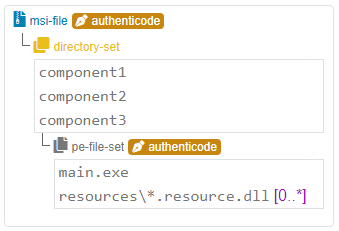
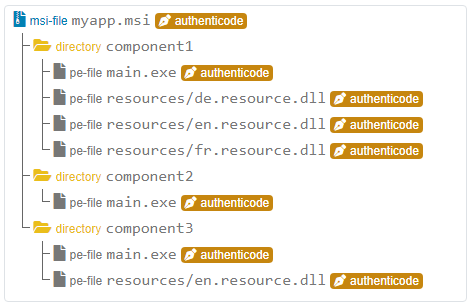
This artifact configuration describes an MSI installer package containing several components. The components have a similar structure and are therefore defined as a <directory-set>. Each component contains a main.exe and zero or more resource DLLs.
|
|
Example of a directory structure that would match this configuration:
(All |
|
Metadata restrictions
MSI and PE file metadata restriction
<artifact-configuration xmlns="http://signpath.io/artifact-configuration/v1">
  <parameters>
    <parameter name="version" required="true" />
  </parameters>
  <msi-file subject="MyProduct" author="ACME Inc.">
    <!-- requires all pe-files to have the respective attributes set -->
    <pe-file-set product-name="MyProduct" product-version="${version}" file-version="${version}"
                 company-name="ACME Inc." copyright="Copyright ACME Inc." original-filename="${file.name}">
      <include path="main.exe" />
      <!-- for mylibrary, override product name, interit all other attributes from parent pe-file-set -->
      <include path="mylibrary.dll" max-matches="unbounded" product-name="MyLibrary" />
      <for-each>
        <authenticode-sign />
      </for-each>
    </pe-file-set>
    <authenticode-sign /> <!-- finally sign the MSI file -->
  </msi-file>
</artifact-configuration>
XML file schema restriction for CycloneDX SBOM
<artifact-configuration xmlns="http://signpath.io/artifact-configuration/v1">
  <!-- with this restriction, only CylconeDX 1.5 SBOM files can be signed with this artifact configuration -->
  <xml-file root-element-namespace="http://cyclonedx.org/schema/bom/1.5" root-element-name="bom">
    <xml-sign/>
  </xml-file>
</artifact-configuration>